Free research tool · English vocabulary
Free CEFR Vocabulary Checker & Text Analyzer (A1–C2)
Use this free CEFR vocabulary level checker and text analyzer to review English writing against a target from A1 to C2. Find advanced words and test simpler synonyms or clearly labelled broader terms in context.
Free to use · Your text stays in your browser
Language Lab · Research tool
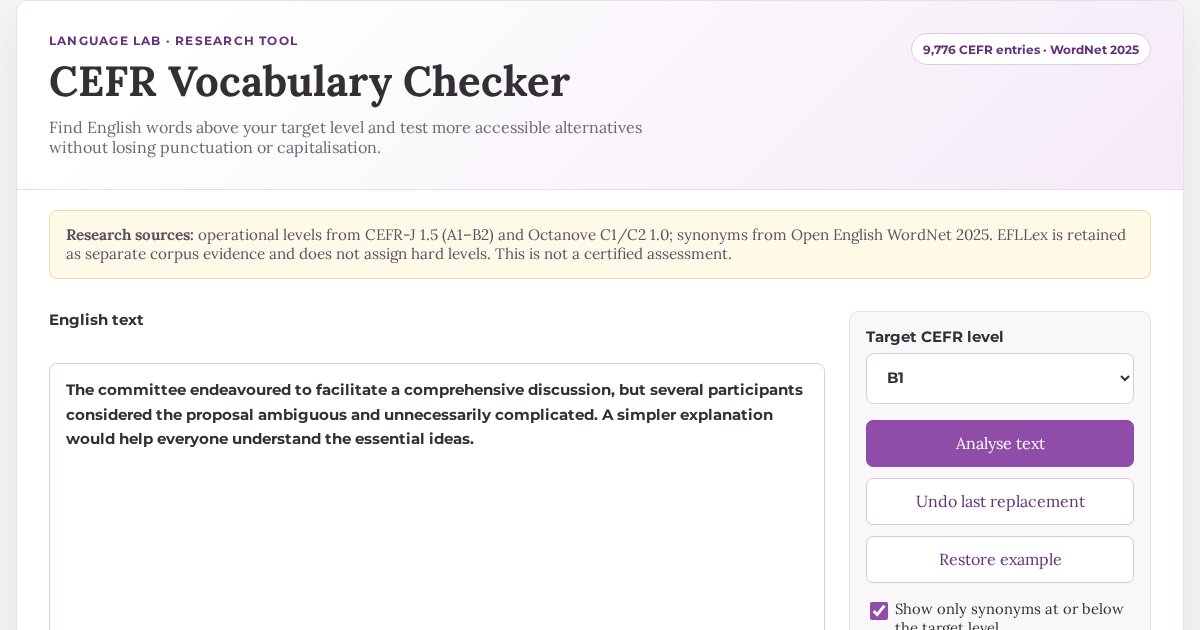
CEFR Vocabulary Checker
Find English words above your target level and test more accessible alternatives without losing punctuation or capitalisation.
Unclassified forms
These forms have not been assigned a CEFR level, so the analysis is partial. When Open English WordNet contains a common-word entry, synonym candidates are shown with an N/A level. Likely proper names, place names and numbers are excluded.
Interactive text
Highlighted words
Lexical detail
Words to review
How it works
How to check the CEFR vocabulary level of a text
The checker focuses on lexical accessibility. It does not assign a single certified CEFR level to the whole text; instead, it shows which classified words exceed the level you have chosen.
Choose your readers’ level
Select A1, A2, B1, B2, C1 or C2 as the vocabulary threshold for your text.
Find advanced words
See highlighted forms, their lemmas, parts of speech, CEFR classifications and sentence context.
Review alternatives in context
Start from the suggested WordNet sense, change the sense or part of speech when needed, and test a replacement without losing case or punctuation.
Methodology
Lexical sources, coverage and limitations
How levels are assigned
Operational CEFR levels come from CEFR-J 1.5 for A1–B2 and the Octanove C1/C2 1.0 extension. Entries are matched by lemma and part of speech. The active index contains 9,776 source entries, and productive English inflections are resolved without inventing a new level.
How alternatives are selected
Synonym candidates come from Open English WordNet 2025 and remain grouped by sense. Contextual part-of-speech and construction checks remove incompatible candidates. When no synonym is available at the target level, the tool may show a direct hypernym at that level, or at the closest available lower level. Hypernyms are labelled as more general terms because they can remove important detail. This fallback applies to noun and verb senses; adjectives and adverbs may require rewording. Users can correct the detected part of speech and change the suggested sense, but no automatic substitution can guarantee an identical meaning in every sentence.
What unclassified forms mean
Proper names, specialist terms, uncommon forms or uncovered words remain explicitly unclassified so that incomplete coverage is never presented as certainty.
Privacy and responsible use
Analysis happens locally in the browser. The pasted text is not uploaded to an external service. Results are intended for editorial and research support, not as a certified assessment of a learner or a complete measure of textual difficulty.
Practical uses
Who can use this CEFR vocabulary profiler?
Language teachers
Check whether reading materials and classroom instructions contain vocabulary above a group’s target level.
Materials writers
Review lexical choices while adapting lessons, graded readers, exercises and assessment prompts.
Researchers
Inspect CEFR-linked lexical evidence while keeping source coverage and uncertainty visible.
Students and editors
Identify potentially difficult vocabulary and explore simpler candidates without treating them as automatic corrections.
Questions
About this CEFR text and vocabulary analysis
How do I check the vocabulary level of an English text?
Paste your text into the checker, select a target CEFR level from A1 to C2, and choose “Check vocabulary level.” The analysis highlights classified words above your target and keeps unclassified forms visible. It checks lexical accessibility rather than assigning a certified level to the whole text or to its writer.
Can I use this as a CEFR word level checker?
Yes. The CEFR word checker compares individual words with your selected A1–C2 target, shows their available classifications, and identifies vocabulary that may need review.
Can I use it as a CEFR writing checker or CEFR text checker?
It can support writing and text revision by checking vocabulary against a chosen threshold. However, it is not a general CEFR text level checker or overall CEFR level checker: it does not assess grammar, coherence, discourse or the writer’s proficiency.
Does the checker calculate the CEFR level of the whole text?
No. It compares classified words with the CEFR target you select. Grammar, discourse, sentence structure, background knowledge and conceptual difficulty also affect how challenging a text is.
Is every suggested synonym safe to substitute?
No. Suggestions are grouped by WordNet sense and filtered for grammatical compatibility, but meaning, register, collocation and tone must still be checked in the complete sentence. More general terms are shown separately and intentionally reduce specificity.
Why does the tool leave some words unclassified?
A visible “unclassified” result is more accurate than an invented level. Coverage varies across lexical sources, particularly for names, specialist vocabulary, compounds and uncommon forms.